
Nobody in the office hears any of it. No missed call alert, no email, no note on anyone's desk. By Monday morning that customer has rung someone else.
A call flow is the set of rules inside your phone system that decides which phone rings, for how long, and where the call goes next. Four settings do most of the work: ring order, ring time, the busy rule and the after-hours rule. Change one and calls land somewhere different. These four are often set once during installation and never opened again.
Sixfam is a business phone and IT provider in Keysborough, in south-east Melbourne. Below is what each setting does, and how to check yours from your own mobile.
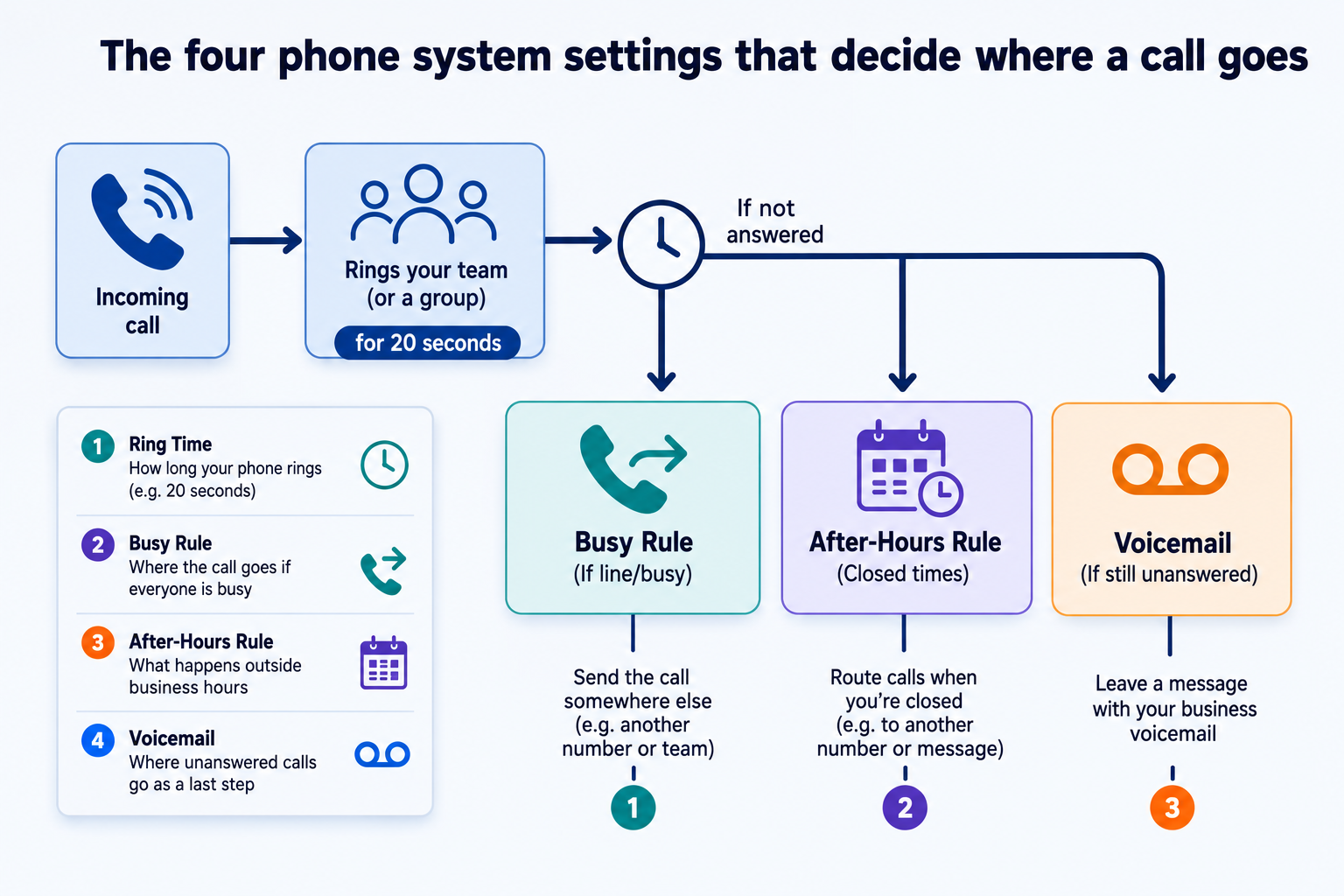
A call flow is the path a call takes from the moment it arrives on your number to the moment someone answers it or it stops. Your phone system follows the same path for every caller, every time.
The words change between systems. These four come up most:
A hosted platform, an on-premise PBX (the phone box sitting in your comms cupboard) and an older telephone communication system all work on these four ideas, whatever the menus call them.
Ring order decides which phones light up and in what sequence. Ring all means every phone in the group rings at once. Sequential, sometimes called prioritised hunt, rings one phone, then the next, then the next.
Ring all gets the call answered faster. Sequential sends every call to the same person first, which suits a business where one person should get first crack at new enquiries.
Ring time is the number of seconds a phone rings before the call moves on. This is the setting most often left at whatever the installer typed in.
The busy rule covers the caller who arrives while every phone is already in use. The call can wait in a queue, go to a second group, or go straight to voicemail. If you have never chosen, the system chose for you.
The after-hours rule switches the call flow when your office hours end. It usually points at voicemail. It can point at a mobile instead.
Twenty seconds is the common factory default. 3CX ring groups arrive set to 20 seconds and call queues to 30. Microsoft's own guidance for Teams call queues recommends at least 20 seconds.
The standard Australian ring pattern repeats every three seconds: two short bursts, then a pause. So you can turn a setting in seconds into the number of rings a caller sits through.
| Ring time you set | Rings the caller hears | Where it fits |
|---|---|---|
| 10 seconds | About 3 | A desk phone that rolls to a mobile straight after |
| 15 seconds | About 5 | A small team where someone else picks up next |
| 20 seconds | About 6 or 7 | The common default. Suits most offices |
| 30 seconds | About 10 | One reception phone with nothing set up after it |
| 40 seconds | About 13 | A long wait, and rarely useful with no second step behind it |
Check your ring order before you change the number. On ring all, the ring time is the whole wait. On sequential, each phone gets the full ring time. Three phones set to 20 seconds each keeps a caller listening for a minute.
Most Australian business plans now slow the speed when data runs out instead of charging for extra data, commonly to around 1.5Mbps. That is workable for email and maps, and painful for a video call.
An auto attendant is a recorded greeting that answers every call and offers the caller a menu of options.
A menu earns its place in three situations. You have three or more destinations that genuinely handle different work. Reception fields a steady stream of calls meant for one department. Or you want after-hours callers told your opening hours rather than hearing a beep.
It costs you calls in a two or three person office. Industry guidance puts a good greeting at 15 seconds or less. Add a 20 second ring time behind it and the caller waits around 35 seconds before a person speaks. On a direct line they would have been talking at six rings.
If you keep a menu, three rules hold up:
Recording and loading a greeting is a one-off job. It sits in the setup part of a quote rather than the monthly line.
Your phone system holds two separate schedules. The business hours rule runs weekly and repeats forever. The holiday rule is a list of specific dates, and somebody has to type those dates in and update them every year.
A system that closes correctly at 5pm every weekday will still ring an empty office all day on Melbourne Cup Day. The holiday rule is a separate setting.
Business Victoria publishes the dates. Five Victorian public holidays are left in 2026:
Regional Victoria has its own list. Business Victoria publishes non-metropolitan holidays separately and adds them through the year as councils supply the dates. The 2026 list includes Greater Geelong on Wednesday 21 October, the part of Greater Bendigo west of the Campaspe River on Wednesday 28 October, and Wodonga on Friday 27 November for the Gold Cup. Melbourne Cup Day covers all of Victoria unless a non-metro council has swapped it for a local holiday. If your customers or your staff sit outside Melbourne, the metro list on its own will leave gaps.
An after-hours rule can point at a mobile instead of voicemail. A trades business in Dandenong South might close the office at 4pm and still want the phones reaching a mobile until 6pm. That is two rules working together: business hours ending at 4pm, and an after-hours destination pointing at a mobile until 6pm, then voicemail.
Running phones across two or more sites brings in a different set of settings again, and that is a separate piece.
Voicemail to email sends a copy of each message to an email address as a sound file, usually within a minute of the caller hanging up.
Switching it on is the easy half. A shared inbox four people can see is a box nobody owns. Name one person, write their name next to that box, and tell them it is theirs.
Check one more setting while you are there. Some systems delete the message from the handset once the email goes out, and some leave it. If it leaves the message, the light on the phone stays on and staff stop trusting it. If it deletes the message and the email fails, that message is gone.
A business that says it is missing calls is usually looking at one of two settings. Either the ring time is too short for the way the phones are ordered, or the holiday rule has not been touched since the system went in. Both show up in a test you can run yourself.
Five calls, ten minutes, and a short list of where each one landed.
Fix the destination before you touch the timing. A longer ring time changes nothing if the call still ends in a box nobody owns. Set where the call goes, then set how long it waits to get there.
Put the holiday rule in your diary for January. The dates move every year, and 2027 moves more than most. Christmas Day falls on a Saturday and Boxing Day on a Sunday, so Victoria adds substitute holidays on Monday 27 December and Tuesday 28 December. The Friday before the AFL Grand Final has no 2027 date yet. Business Victoria publishes it once the AFL releases the season schedule. So a holiday list typed up in January 2027 will need one date added to it later in the year.
Before you change anything, ask your provider for a written copy of your current call flow: the ring order, the ring time in seconds, the busy destination, the after-hours destination and the holiday list. If nobody can produce that inside a day, that tells you something on its own.
To go through yours, call 03 9200 2800.
A call flow is the set of rules that decides which phone rings, for how long, and where a call goes when nobody answers. It runs on every incoming call without anyone touching it. Four settings carry most of the weight: ring order, ring time, the busy rule and the after-hours rule.
Twenty seconds suits most offices, which is about six or seven rings to the caller. Under 15 seconds and staff can struggle to reach a ringing phone in time. Over 30 seconds you are asking the caller to sit through ten rings or more. Check your ring order first, because on a sequential setting each phone rings for the full time before the next one starts.
A ring group is a list of phones that ring when a call arrives. An auto attendant is a recorded greeting that answers the call first and asks the caller to choose an option. Many businesses use both: the menu takes the choice, then the choice rings a group.
A two or three person office rarely gains from one. The greeting and menu add around 15 seconds before anyone speaks, and in a small team whoever picked up could probably have helped. A menu starts to pay off once you have three or more destinations that genuinely handle different work.
The holiday rule is separate from the weekly business hours rule, and it only covers dates that have been entered into it. If nobody added this year's dates, the system treats the holiday as an ordinary weekday. Victorian dates shift each year, and regional councils declare their own on top of the state list.
Yes. The after-hours destination can point at a mobile number, a group of mobiles, or a mobile first and voicemail after a set number of seconds. Give the destination its own time limit so the phone stops ringing at a reasonable hour rather than at midnight.
Designed & Developed by CJ Digital